Digital spiral notebook that maps the 10‑minute day visually
Replicates a tactile 10-minute paper planner with page-turn animations and a spiral-bound notebook aesthetic, placing a single daily page at the centre of the workflow. Developed by Leanagilehungry . Inc for Android and other platforms, the app pairs a granular 06:00–05:00 timetable with drag-to-highlight time-blocking and analog task symbols. Key tools include automatic time calculation, stylus handwriting support, and optional end-to-end encrypted sync. It suits students and professionals who prefer visual, low-distraction daily planning for focused routines.
It reproduces a physical 10‑minute planner in a mobile app
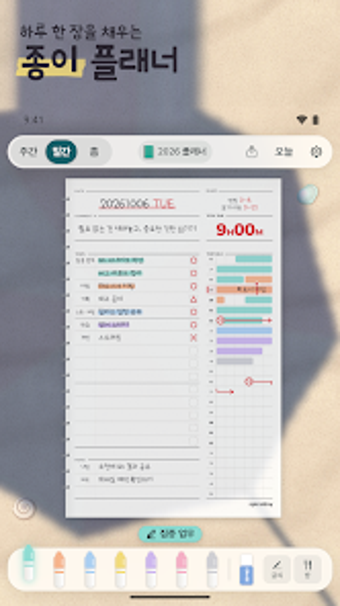
Spiralday copies the look and feel of a paper notebook through realistic page-turning animation and a spiral-bound interface, and it uses ○, △, and × symbols to mirror handwritten task tracking. The app presents a single page per day with a timetable running from 06:00 to 05:00 the next day, so the core interaction resembles writing on paper while the software keeps digital fidelity of those entries.
Time-blocking and output match a visual daily-planning workflow
The highlighter tool lets users drag colour over 10-minute slots and the app calculates total time for highlighted segments automatically, producing an immediate visual summary of where the day went. The AI assistant can convert unstructured brain dumps into tasks and reminders on supported platforms, and stylus input and a "color with pen only" mode preserve freehand gestures for users who want handwritten notes embedded in the day’s layout.
Privacy, sync, and compatibility reflect discrete collaboration choices
Data stays on-device by default, with an optional end-to-end encrypted sync that links devices via QR or an 8-digit code, so teams or multi-device users can mirror plans without email-based accounts. The app supports Android plus iOS, iPadOS, and desktop betas, and dynamic desk backgrounds adapt lighting to local time, keeping the planning environment visually consistent across devices.
Spiralday suits visually oriented planners who need focused, single‑page days
Spiralday is a useful option for students and professionals who need minute-level visual time-blocking and a tactile planner experience on mobile devices. The app limits planning to a one-page-a-day rhythm and a 10-minute grid, so it is not designed for multi-day project roadmaps or complex task hierarchies. For daily routine management and focused time awareness, it performs well for those comfortable with an analog-style workflow.